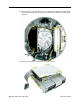
15. Rotate the base so the optical door is on the right. Replace the power supply and the
six screws. Remember, the two smaller screw locations are hidden under the optical
door flap.
16. Attach the hard drive and optical drive to the drive carrier.
100 iMac (Flat Panel) Take Apart
Base Reassembly