
User`s manual



User's manual System Amplifier K&F TOPAS
KLING & FREITAG GMBH © 2014 Version 3.1 Page 11 of 65
4.2 Connectors and Controls
4.2.1 Front
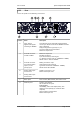
The following connectors and controls are on the front panel:
Position Name Description
A Volume channel 1,
channel 2
B Status display channel
1
Behind the air filter holder [D]
(see page 24)
C Status display channel
2
Display of operational status, signal, limit and
protection circuits.
(see page 15)
D Left air filter holder Push-push lid. Push to open.
E Front Ethernet port Access to all devices on the network (switch), for
service purposes. (see page 18)
F Status display remote Indicates that the device is being monitored/
controlled via network.
G ON/STANDBY button Switches the device between the operating mode
and the standby mode.
(see page 15)
H Status display BRIDGE Indicates that the device is in bridge mode.
I Right air filter holder Push-push lid. Push to open.