
Users Manual

RF1276D27 Long Distance Transceiver module V4.0
- 9 - 2016-6-12
Users can configure the parameters (frequency, data rate, output power, RF Factor, RF Bandwith etc.)
through PC or in circuit.
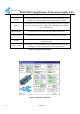
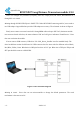
♦Setting through PC.RF1276D27port is UART/TTL. When RF1276D27connecting with PC, users need to
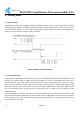
use USB adapter. AppconWireless provides USB adapteras accessory. The schematic is shown in Figure 4
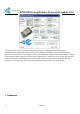
Firstly users connect converter board to PC through DB9 cable and open ‘RF Tool’, theninsert module
into converter board. After that, the status column of ‘RF tool’ will give a indication ‘Found Device’. Users
then can read/write the module.
If users connect USB converter, USB drive ’’PL-2303_Driver_Installer’’need be installed firstly. The
drive has different version for different OS. USB converter has five wires with five different colors: Black,
Red, Blue, Yellow, Green. Black wire is GND pin. Red wire is VCC pin. Blue wire is TXD pin. EN pin and
SET pin should be connect to GROUND.
Figure 4: The connection diagram
♦Setting in circuit . Users also can use microcontroller to change the default parameters. The work
mechanism is the same as in PC.