
Users Manual

RF1276D27 Long Distance Transceiver module V4.0
- 4 - 2016-6-12
6. Working mode
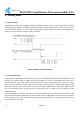
a. Standard mode
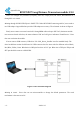
Standard mode is also called transparent mode in which the module receives from or sends data to the host
through serial port (RS232 or RS485) at preset data format and users don’t need to care about the proce ss
of data inside the module. The AUX pin of RF1276D27 will give indication about the data IN/OUT of
serial port 2ms in advance in order to wake up the host.
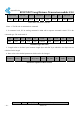
Timing Sequence in Standard Mode
b. Star network mode
In this mode one RF1276D27 module needs to set as the central module and other modules should be node
modules. For central module, it works at the full performance so its power consumption is the same as in
the standard mode. As to node module, some functions of it are closed. If the EN pin is connected to logic
high, the node module only keeps CAD wireless monitor to detect if there is any wireless signal coming
and will not check if there is any data from the host through UART interface. If the node module sends
data to the central module, the host needs to set EN pin to low to activate the node module and then
transfers the data.
In the configuration tool, there is an option for Node ID which is used to set the ID of node module. If the
ID of the node modules is 0x00 0x00, the node module will not make address detection. In other words all
of the nodes will receive the data including address from central module. The data package of the first two
bytes should be the node ID.