
User manual


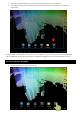

5. After a few seconds the desktop screen will appear (Continue pressing the icon at this point)
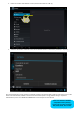
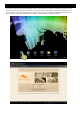
6. Drop and place the icon in the desired position on the desktop. The icon will now appear on your desktop as
shown below.
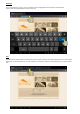
Once the widget is on the desktop, you can move it around or delete it. To do this you must press and hold on the widget
until it is highlighted. You may then move it around, or delete it by dragging it to the “X” icon which appears on screen.
SETTING UP THE Wi-Fi NETWORK
1. Tap on the Settings icon on the main screen (1)