
User manual



WIDGETS
Widgets are applications, which allow easy access to some applications. In fact, it is more than a shortcut to an application
as when you place them on your home screen like icons, they can show you the time, current weather or even your e-mail
inbox without launching the application. To add widgets onto the desktop follow the steps below:
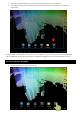
1. Press the “Applications and Widgets” icon situated on the top right hand side of the screen (1)
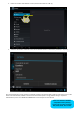
2. Press on the “Widgets” tab (1) which is situated on the top of the screen
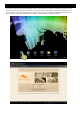
3. Flick (2) through the widgets installed
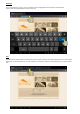
4. Press and hold on the desired widget. (3)