
User manual




MUSIC PLAYER
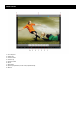
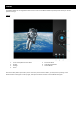
1 – Playlist
2 – Shuffle
3 – Repeat all songs/Repeat current song
4 – Duration of Song
5 – Next Song
6 – Play/Pause
7 – Previous Song
8 – Music Options
9 – Volume Up
10 – Volume Down
11 – Time Elapsed
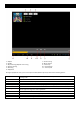
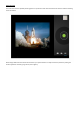
During the playback of music, press on the options button (Button 10) and you will see the following options:
Library
Press this button to view all the pictures as a presentation. Tap on the screen to return to normal
viewing mode.
Party Shuffle
Press this button to play songs in a random order
Add to Playlist
Press this button to add the current playing song to an existing playlist or to a new playlist.
Use as Ringtone
Press this button to send the song into the Alarm tones folder. You may now set this song as your
alarm ringtone through the “clock” application.
Delete
Press this button to delete the song from your tablet.
Sound Effects
Press this button to change the sound effects