
System information


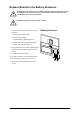


1.IdentifythefaultypowermoduleviathedisplayortheredLEDindicationinthetopright
cornerofthepowermodule.
2.Deactivatethepowermodulebyturningthelockinglatchcounter-clockwisetotheunlocked
position.
3.Unscrewthespring-activatedknobsonbothsidesofthepowermodule.
4.Pullthepowermoduleupandoutoftheenclosureasfarasthelockmechanismallows.
5.Releasethelockbypressingtheblackplastictaboneachsideofthepowermoduleandpull
thepowermoduleallthewayout.
6.Carefullyguidethenewpowermodulecompletelyintothesystem.
7.Securethespring-activatedknobsonbothsidesofthepowermodule.
8.Waituntilthermwareupdateiscompleteandensurethatthenewpowermodulehasthesame
rmwareversionastheotherpowermodulesintheUPSsystem:
aOntheUPSSummaryortheParallelSystemSummaryscreen,presstheUPSSystembutton
inthebottomleftcorner.
bPresstheSystemInformationbuttonontheUPSSystemscreen.
cPresstheFirmwareOverviewbuttontoopentheFirmwareOverviewscreen.
dV erifythatthermwareversionsisthesame.
990–2748E-001
SymmetraPX250/500kW400/480V
41