
System information

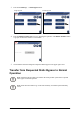

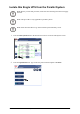
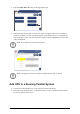


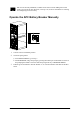


6.Followthestepswhichappearonthescreen.Stepswillappearintheorderinwhichthey
needtobecompleted.Astepwillinitiallyappearinredandthenwhenitiscompleted,the
stepwillchangetogreen.Thenextsteptobecompletedwillbehighlightedinredtextand
yellowbackground.
7.CheckthattheUPSModehaschangedtoNormalOperationintheupperrightcorner.
AccessaConguredNetworkManagementCard
Note:ThebelowprocedureshowshowtoaccesstheNetworkManagementCardfrom
awebinterface.Itisalsopossibletousethefollowinginterfaces:TelnetandSSH,
SNMP,FTP ,andSCP.SeetheNetworkManagementCardInstallationManualfor
moreinformation.
Note:EnsurethatonlyoneNMCintheentiresystemissettosynchronizetime.
UseMicrosoftInternetExplorer
®
(IE)7.xorhigher(onWindowsoperatingsystemsonly)orMozilla
®
Firefox
®
3.0.6orhigher(onalloperatingsystems)toaccesstheWebinterfaceoftheNetwork
ManagementCard.Othercommonlyavailablebrowsersmayworkbuthavenotbeenfullytestedby
APC.
YoucanuseeitherofthefollowingprotocolswhenyouusetheWebinterface:
•TheHTTPprotocol(enabledbydefault),whichprovidesauthenticationbyusernameandpassword
butnoencryption.
•TheHTTPSprotocol,whichprovidesextrasecuritythroughSecureSocketLayer(SSL);encrypts
usernames,passwords,anddatabeingtransmitted;andauthenticatesNetworkManagementCards
bymeansofdigitalcerticates.
ToaccesstheWebinterfaceandcongurethesecurityofyourdeviceonthenetwork:
1.AddresstheNetworkManagementCardbyitsIPaddress(oritsDNSname,ifaDNSname
iscongured).
2.Entertheusernameandpassword(bydefault,“apc”and“apc”foranAdministrator).
3.ToenableordisabletheHTTPorHTTPSprotocol,usetheNetworkmenuonthe
Administrationtab,andselecttheAccessoptionundertheWebheadingontheleftnavigation
menu.
990–2748E-001
SymmetraPX250/500kW400/480V
23