System information
Manuals
Brands
APC Manuals
electrical equipment & supplies
Symmetra PX
21
22
23
24
25
26
27
28
29
30
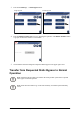
3.
Press
the
UPS
System
button
in
the
bottom
left
corner
to
access
the
UPS
System
screen.
4.
Press
the
Operation
button.
T
ype
in
the
user
password
and
complete
with
Enter
.
5.
Press
System
Start-up
button.
22
Symmetra
PX
250/500
kW
400/480
V
990–2748E-001
1
...
...
24
25
26
27
28
...
...
58