
System information

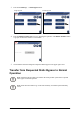

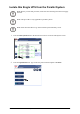




3.PresstheIsolatethisUPSbuttonontheOperationscreen.
4.Followthestepswhichappearonthescreen.Stepswillappearintheorderinwhichthey
needtobecompleted.Astepwillinitiallyappearinredandthenwhenitiscompleted,the
stepwillchangetogreen.Thenextsteptobecompletedwillbehighlightedinredtextand
yellowbackground.
Note:Greybuttonsaretouch-screenfunctions.
Note:ThedisplaywillturnoffwhentheUPSinputbreaker(Q1)isopened.
AddUPStoaRunningParallelSystem
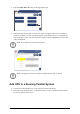
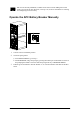
1.ClosetheUPSinputbreaker(Q1).ThiswillpoweruptheUPSdisplay.
2.Whenthescreenbecomesactive,verifythatallUPSissetupasaparallelsystemandthat
allunitsareshownonthescreen.
990–2748E-001
SymmetraPX250/500kW400/480V
21