
User manual






Configuration – Parts Replacement
990-2820A Smart-UPS® ISX 30-40 kVA, 400V Operation 23
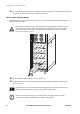
How to replace a Network Management Card
Loosen the 2 torx screws (one each side of the card).
Carefully pull out the card.
Install the new card.
Reattach the 2 torx screws.
1
0/
10
0B
as
e-T
Probe
A
P
9619
Ne
t
work
M
ana
g
e
m
ent
Ca
r
d
EM
!
R
e
s
e
t
Out
pu
t
P
w
r
Z
o
ne
10/
1
00
Model:
Serial:
BATTERY UNIT
Model:
Serial:
BATTERY UNIT
Model:
Serial:
BATTERY UNIT
Model:
Serial:
BATTERY UNIT
10/100Base-T
Probe
AP9619 Network Management Card EM
!
Reset
Output
Pwr
Zone
10/100