
User manual






Configuration – Parts Replacement
990-2820A Smart-UPS® ISX 30-40 kVA, 400V Operation 21
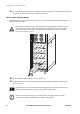
How to remove Battery Modules
Follow the below procedures if you need to change or add a Battery Module, e.g. if you receive a display
message reporting a bad battery, or if you need to add batteries for increased runtime.
Holding the battery handle, gently push the battery unit upwards and pull it halfway out of the
Enclosure. A lock mechanism prevents it from being pulled all the way out.
Battery Module APC Part No.
1 Battery Module (4 batteries) SYBT4
Network Management Card and Temperature/humidity Sensor APC Part No.
Network Management Card with temperature sensor AP9619
Temperature/humidity Sensor AP9512THBLK
Two people to lift a component weighing between 18 – 32 kg.
Note
When removing Battery Modules, start from the highest level and work down.
10/100Base-T
Probe
AP9619 Network Management Card EM
!
Reset
Output
Pwr
Zone
10/100
Model:
Serial:
BATTERY UNIT
Model:
Serial:
BATTERY UNIT
Model:
Serial:
BATTERY UNIT
Model:
Serial:
BATTERY UNIT
Model:
Serial:
BATTERY UNIT
Model:
Serial:
BATTERY UNIT
Model:
Serial:
BATTERY UNIT
Model:
Serial:
BATTERY UNIT
Model:
Serial:
BATTERY UNIT
Model:
Serial:
BATTERY UNIT
Model:
Serial:
BATTERY UNIT
Model:
Serial:
BATTERY UNIT
Model:
Serial:
BATTERY UNIT
Model:
Serial:
BATTERY UNIT
Model:
Serial:
BATTERY UNIT
Model:
Serial:
BATTERY UNIT
Model:
Serial:
BATTERY UNIT
Model:
Serial:
BATTERY UNIT
Model:
Serial:
BATTERY UNIT
Model:
Serial:
BATTERY UNIT
Model:
Serial:
BATTERY UNIT