
User manual






990-2820A Smart-UPS® ISX 30-40 kVA, 400V Operation 17
Configuration
Connection of Load to the PDU
Connecting load to the PDUs
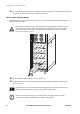
Connecting 1-phase load to PDU I
Set the applicable
breaker to the OFF
position.
Guide the load cable
down through the top
hole.
Insert the plug from the
load into the C19 outlet.
Secure the plug by
inserting the locking
brackets.
Set the applicable
breaker to the ON
position.
Note
Connect the load evenly between the 3 phases to avoid overloading one particular single
phase. The total output capacity of the PDU is approximately twice the output capability
of the UPS, meaning that the UPS would be over-loaded if all outlets were loaded to their
rating. Load status on the individual phases can be found through the UPS display or
through the web interface.
Note
Equipment connected to the 3-phased output may require overcurrent protection with a
lower rating than the 3-phased output.
Note
For 3-phased outputs, the highest current may be in the Neutral conductor at non-linear
loads (up to 173%).
1 2 3