
Specifications




SURT Stack/Rack-Mount 12U 14000/18000 VA 200 Vac 15000/20000 VA 208/240 Vac 9
Route network cable
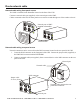
Network cable wiring front panel access
The NMC is installed in the SmartSlot located on the front of the UPS.
Connect a network cable (not supplied), to the network port on the NMC.
Cables connected to the UPS for front panel access must be routed through one of the notches on bezel.
Network cable wiring rear panel access
Network connection can be accessed from the RJ45 connector located on the rear panel of the UPS.
1. Locate the RJ45 connector on the front panel of the UPS. Connect the jumper cable (supplied), to
the NMC RJ45 connector labeled NETWORK.
2. Connect a network cable (not supplied), from a network device to the RJ45 connector on the rear
panel of the UPS.
su0177a
Network cable
Network port on NMC
installed in SmartSlot
su0176a
RJ45 connector
Network cable connected to rear
panel RJ45 connector
Network cable
Network port
Jumper cable
25.4 cm (10 in)
Network port