
Specifications




SURT Stack/Rack-Mount 12U 14000/18000 VA 200 Vac 15000/20000 VA 208/240 Vac 8
Communication ports
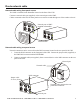
Display interface installation
Prior to attaching the display interface to the UPS:
1. Loosen two bracket screws on rear of display interface.
a. Slide bracket to the position that will accommodate screw holes on the UPS.
b. Tighten screws on bracket.
2. Insert display interface tabs into slots on UPS.
3. Secure display interface to UPS using two thumb screws attached to display interface.
Serial Com port and
Display Interface connector
Use only the supplied cable to connect to the serial port.
A standard serial interface cable is incompatible with the UPS.
Communication ports on the
Network Management Card
Refer to “Front and rear UPS
panels” on page 5 for port
identification.
Refer to the NMC user manual for local configuration instructions.
s
u
0
1
5
9
a
su0161a
Connect display interface cable to RJ45 connector labeled Display,
located on the front of the UPS.
E
S
C
?
L
O
A
D
O
N
O
N
-
B
A
T
T
B
Y
P
A
S
S
F
A
U
L
T
su0160a