
Specifications


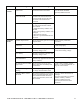



SURT Stack/Rack-Mount 12U 14000/18000 VA 200 Vac 15000/20000 VA 208/240 Vac 22
Setup/Settings/Alarms
Alarm Thresholds/Load
14 kVA
14 kVA 2, 4, 6, 8, 10, 12, 14 kVA,
Never
If the connected load exceeds the load alarm threshold
an alarm is activated.
15 kVA
15 kVA 5, 10, 15 kVA, Never
18 kVA
18 kVA 2, 4, 6, 8, 10, 12, 14, 16,
18 kVA, Never
20 kVA
20 kVA 5, 10, 15, 20 kVA, Never
Alarm Thresholds/Runtime
All models
0 0, 5, 10, 15, 30, 45 min;
1-8 hrs
When remaining battery runtime is at or below the
selected runtime threshold, an alarm is activated.
Setup/Settings/Clock
Date
The date and time functions are used to time-stamp
events in the event log. To avoid inaccuracies, change
the time setting to reflect day light saving time where
applicable.
Time
Setup/Settings/Other
Self Test
14 days 7, 14 days, At Pwr On, OFF Set interval at which UPS will execute a self-test.
User ID
Uniquely identify UPS, (i.e. server name or location)
for network management purposes.
Ext Bat Cap
0 Ah 0-200 Ah Press the ENTER key. Use the UP/DOWN arrow keys
to select desired value. Press the ENTER key to move
to next digit. Press the ENTER key after selecting final
value, to lock in battery capacity setting.
Display
Display Setup
Language
Select language desired for viewing menu screens.
Contrast
0 0-7 Adjusts contrast between LCD text and back lighting.
Beeper Setup
Beep at
PwrFail +30 PwrFail +30, PwrFail,
Low Bat, Never
An alarm can be set to warn of an imminent power
failure, a power failure that will occur in 30 seconds,
or when a low battery condition occurs.
Volume
Low Off, Low, Medium, High Sets beeper volume.
Key Click
Off Off, On Sets key click volume to On or Off.
Configurables Factory
Default
User Selectable Choices Description