
Owners manual






KVM Access Management Software User Manual72
Unsupported Devices
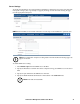
Devices whose firmware level is not compatible with the KVM ACCESS' current firmware level are
unsupported. Click Unsupported Devices on the Menu Bar to open a page that lists all such devices
deployed on the KVM ACCESS installation:
To make these devices available for management under KVM ACCESS, upgrade their firmware to the
latest version.
1. Add the device's firmware upgrade file to KVM ACCESS. See “Appliance Files” on page 92 for
details.
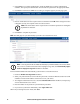
2. Once the device's firmware upgrade file is stored on KVM ACCESS, its checkbox on this page
becomes active. Click to put a check mark in the checkbox.
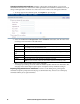
3. The Firmware Upgrade button (at the top-right of the panel), becomes active.
4. Click Firmware Upgrade to upgrade the device's firmware.
Once the firmware upgrade completes, the device is removed from the Unsupported Devices list, and
now appears in the Available Devices list (see “Adding a Folder or Device” on page 51).