
Owners manual


69KVM Access Management Software User Manual
Properties Page Action Buttons. The action buttons on the devices and outlets pages are the same,
and perform the same functions as those found on the KVM properties pages. See “Properties Page
Action Buttons” on page 64 for details.
Access Rights (PDU), Stations, and Outlets. Access rights can be configured for the entire device
(nested stations and outlets), station-by-station, or outlet-by-outlet. After selecting the device, station, or
outlet, clicking this Panel Menu item brings up a page that shows a list of all the users and groups that
have been given access to it.
Adding Users or Groups to the Device, Station, or Outlet Access List. Configuration and access
rights for devices, stations and outlets, can be set for users and groups. To set the rights for users or
groups:
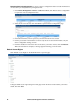
1. Click Add to open a list of qualified users and groups.
2. Click to put a check in the box in front of the names of the users or groups that you want to have
access to the device, station, or outlet.
3. Set the configuration rights for the users or groups. (See page 66 for details.)
4. Set the access rights for the users or groups. (See page 66 for details.)
5. Click Save when you have finished to add the new users and group to the device, station, or
outlet User/ Group list.
Modifying a User's or Group's Rights.
1. In the Configuration Rights column for the user or group to be modified, click on the arrow,
select the new value, then click Close.
2. In the Access Rights column for the user or group to be modified, click on the arrow, select the
new value, then click Close.
3. Click Save (at the top-right of the panel).
Deleting a User's or Group's Rights.
1. Click to put a check in front of the names of users or groups to be removed.
2. Click Delete (at the top-right of the panel).