
Owners manual




KVM Access Management Software User Manual54
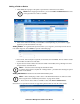
To add an Aggregate Device:
1. Choose Aggregate Device Model from the drop down menu. Model options include Generic,
IPMI, HP ILO2, IBM RSA II, Dell DRAC 5, and Dell DRAC 6.
2. Click Next to open the Configuration Properties page.
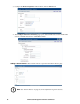
• To configure Aggregate Device properties:
– Provide a name to identify the aggregate device in the Name field.
– Provide a further description of the aggregate device in the Description field. (Optional)
– Drop down the Department, Location, and/or Type list(s) and click on the one(s) to which you
want the aggregate device to belong. (Optional)
– Provide the name and telephone number of the device administrator in the Contact
Information field. (Optional)
– Choose Power Control Options. (Optional)
3. When finished, click Next to open the Configure Network Connectivity page.