
Owners manual




KVM Access Management Software User Manual50
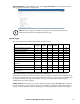
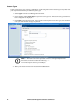
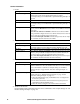
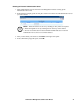
Device types that can be added and configured are found under the Add drop down list at the top of the
main panel.
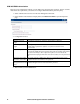
Type Purpose
Device Select to add devices into the KVM ACCESS system.
Note: When devices are added all of their ports are locked by default and must be unlocked. See
“Locking / Unlocking Ports” on page 60 for details. This allows addition of devices containing
ports beyond the number allowed by the license. You can select specific ports to unlock to gain
access to critical ports while remaining within the license restrictions.
Aggregate
Device
Select to create a logical device consisting of ports selected from devices that have been added to
the management system.
This is used to manage a device with multiple connection methods (KVM, power, and serial ports,
for example), without having to use a separate connection for each. Each Aggregate Device counts
as one node regardless of the number of ports it contains, so that creating aggregate devices and
adding ports to them allows you to manage a number of ports beyond the physical license
restrictions. See Adding an Aggregate Device, page 85 for details.
Note: 1. A port that has been made part of an aggregate device can only be used with that device. It
cannot be assigned to any other device without being removed from the aggregate device.
2. Once a port has been made part of an aggregate device, it is no longer treated as an individual
port, and cannot be locked or unlocked manually. If at some point you want to treat this port as a
physical port, or add it to a group device you must first delete it from the aggregate device.
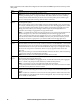
Blade Chassis Select to add a blade chassis.
Generic
Device
Third party generic devices (routers, switches, etc.) can consist of any device that contains an
Ethernet interface and can be accessed by its URL or IP Address via HTTP/HTTPS, or Telnet/SSH.
Since these devices have no provision for CC management, they cannot be authenticated through
the KVM ACCESS, and are not part of the KVM ACCESS's single sign on configuration. Generic
devices do not occupy device node licenses. There is no proxy support for these devices (see
page 104).
When you select this type of device the KVM ACCESS redirects to the device, itself. You must log
in to the device using its own authentication procedure.
Note: Generic Devices do not count against the number of license nodes.
Group
Device
Group devices are also created as a composite of ports that exist on actual devices. The differences
between Group and Aggregate Devices are:
Once a physical port is added to an Aggregate device, it cannot be used with any other Aggregate
Device - whereas a physical port can be added to any number of Group Devices
Note: 1. Group Devices do not count against the number of licensed nodes.
2. A physical port that is added to more than one Group Device only counts as one license no matter
the number of Group Devices to which it is added.
Folder Device folders provide another method (in addition to Departments and Locations) of organizing
related devices into useful categories to make it easy to configure and maintain similar types of
objects.
Note: 1. Folders are containers for devices and do not count against the number of licensed nodes.
2. Since Folders are organizational tools for device management, they do not show up in the Port
Access Sidebar or main panel list.