
Owners manual




KVM Access Management Software User Manual46
Service Information.
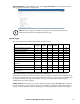
1. LDAP
2. Active Directory
3. RADIUS and TACACS+
4. Windows NT Domain
Get the Domain Name information from the service administrator. For example settings see “NT
Domain Settings Example” on page 121.
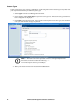
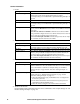
Heading Information
Connection Settings Get the information for these fields from the LDAP administrator. The port
default is 636. Check with the LDAP administrator to confirm.
For example settings see “LDAP/LDAPS - OpenLDAP Setting Example” on
page 118.
SSL Mode • Click the Do not use SSL radio button to use LDAP.
LDAP User Schema Get the information for these fields from the LDAP administrator.
For example settings see “LDAP/LDAPS - OpenLDAP Setting Example” on
page 118.
Browsing Method When adding or modifying user accounts (see “Add a user account” on
page 31), click the Browse button to see all users in User RDN to choose the
Login name.
• Select Browse with user credentials to allow the user to browse LDAP
using credentials configured on the server. When selected, the user does not
have to input his credentials each time he browses.
• Select User must input credentials when browsing to have the user input
his credentials each time he browses the LDAP.
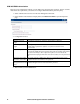
Heading Information
Connection Settings Get the information for these fields from the Active Directory administrator.
For example settings see Active Directory Settings Example, page 239.
SSL Mode Click a radio button to choose whether or not to use SSL in Trust All mode.
Browsing Method • Select Browse with user credentials to allow the user to browse the Active
Directory using credentials configured on the server. When selected, the
user does not have to input his credentials each time he browses.
• Select User must input credentials when browsing to have the user input
his credentials each time he browses the Active Directory.
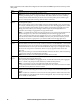
Heading Information
Connection Settings Get the information for these fields from the service administrator. The
default for RADIUS is 1812; the default for TACACS+ is 49. Check with the
service administrator to confirm. For example settings see “RADIUS
Settings Example” on page 120 and “TACACS+ Settings Example” on
page 121.
Authentication Settings Get the information for these fields from the service administrator. For
example settings see “RADIUS Settings Example” on page 120 and
“TACACS+ Settings Example” on page 121.
1. Select the Authentication type your RADIUS server is configured for
from the drop down list.
2. In the Shared Secret field, enter the character string that you use for
authentication with the RADIUS server.
3. Enter the shared secret again in the Confirm Shared Secret field.