
Owners manual




KVM Access Management Software User Manual36
Unlocking User Accounts
If a user is locked out after exceeding the allowed login attempts, and the Force Manual Unlock option
has been enabled (see “Lockout Policy” on page 94):
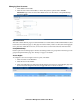
1. Select Users in the Sidebar. The locked user account will show Locked in the Status column.
2. In the Interactive Display panel, check the user whose account you wish to unlock.
3. Click Unlock at the right of the panel.
4. In the popup that opens, click OK.
Note: 1. Unlock more than one user by checking as many names as required. Unlock all
locked accounts by checking the box at the top of the column.
2. If all users, including the System Administrator, get locked out, the System Administrator
can use the KVM ACCESS Utility to restore his account and then unlock the users. See
“Restore” on page 111.