
Owners manual



115KVM Access Management Software User Manual
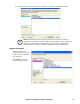
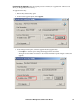
6. The utility finds your device, and lists it in the Device List panel. Click Next to continue.
Note: Check Firmware Version compares the device's firmware level with the
upgrade files. If the device's version is higher than the upgrade version, a dialog box
opens giving you the option to Continue or Cancel. If you don't enable Check
Firmware Version, the Utility installs the upgrade files without checking them.
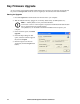
Upgrade Succeeded
When the upgrade has
completed, a screen opens to
inform you that the procedure
was successful.
Click Finish to close the
Firmware Upgrade Utility.