
Datasheet



Network Shutdown Module V3
User guide
Network Shutdown Module V3 – User Manual Page 46/53
7.8.5.4 mgeRunAs software utility (For Windows NT/2000/XP/2003)
• Presentation:
Network Shutdown Module action is carried out in the security context of the user's account. It may be
necessary to modify the context before certain actions may be run.
MgeRunAs.exe is the means for a user to run specific tools and programs with permissions that are
different from those assigned to the user's account.
• Localisation: The executable may be found in the Network Shutdown Module installation directory (by
default <Program Files\...\NetworkShutdownModule\bin\tools>).
• Instructions for use:
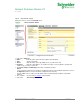
• Fill in the domain name as well as the user's name and password.
• Indicate the program or command to be run using the specified account.
• Click the Generate button.
• Copy the command line and paste it in your application. This line may be used as it is in a Network
Shutdown Module Run action or in a script file.
• The Open console option opens a DOS emulation console during execution.
• Remark. The information on the user profile is encrypted in the command line. Encryption also depends
on the executable and the parameters mentioned. If the name of the executable or one of the parameters
is changed, the command line must be generated (encrypted) again.