
Datasheet



Network Shutdown Module V3
User guide
Network Shutdown Module V3 – User Manual Page 42/53
7.8.2 Events Tab
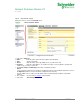
In this tab you can associate the action with the event(s) that will trigger the action:
Events Tab
• Select the action from the left hand side of the above screen
=> The list of events already associated with this event appear (checked boxes)
• Check (or uncheck) the events you wish to associate with this action
• Save your configuration using Save change(s) button.
For each event, an on-line help is displayed when the mouse pointer is positioned over it.
Following events can trig the actions. They are classed by category:
7.8.2.1 Notification alarms
These alarms are mainly dedicated to trigger user notification actions:
• Utility failure The system is now powered by the UPS battery
or [by the utility]
• 'Run time to shutdown' alarm Alarm to indicate the remaining time before system shutdown
• UPS fault (internal fault or battery fault) Internal UPS fault or battery fault was detected
or [end of Internal/Battery fault]
• UPS overload The output is over loaded
or [the output load is correct]
• Output on bypass UPS has switched to automatic or manual bypass mode
or [end of bypass alarm]