
Specifications




Back-UPS BR1000G-BR Installation and Operation
7
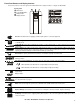
Function Button Quick-Reference
Function Button
Timing
(seconds) UPS Status Description
Power
Power On
0.2 Off
Press POWER to start receiving input A/C power. If A/C input power is
not available, the Back-UPS will run on battery power.
Power Off
2On
The Back-UPS is not receiving input A/C power, but is providing surge
protection.
Display
Status Inquiry
0.2 On
Verify the status or condition of the Back-UPS. The LCD will illuminate
for 60 seconds.
Full-Time/
Power-Saving modes
2On
The LCD will illuminate and the Back-UPS will beep to confirm the
Full-Time mode. The LCD will not illuminate and the Back-UPS will
beep to confirm the Power-Saving mode. While in Power-Saving
Mode, the LCD will illuminate if a button is pressed, then goes dark
after 60 seconds of no activity.
Mute
Event Specific
0.2 On
Disable any audible alarms caused by an event.
General Status
Enable/Disable
2On
Enable or disable the audible alarms. The Mute icon will illuminate and
the Back-UPS will beep one time. The Mute function will not activate
unless the Back-UPS is operating on battery power.
Sensitivity
6Off
The Load Capacity icon will blink, indicating that the Back-UPS is in
program mode. Use the POWER button to scroll through Low, Medium,
and High, stop at selected sensitivity. The Back-UPS will beep to
confirm selection. See Configuration for details.
Master/Controlled outlet
Enable/Disable
2On
The leaf icon will not illuminate indicating that the Master outlet feature
is disabled, or illuminate to indicate the Master outlet feature is
enabled. The Back-UPS will beep once.
Master/Enable Threshold
Calibration
6On
While calibrating the threshold setting, the device connected to the
Master outlet should be turned off or placed in Standby or Sleep mode.
Upon completion, Power-Saving icon will flash 3 and beep 3 times.
Self-Test (manual)
6On
The Back-UPS will perform a test of the internal battery. Note: This will
happen automatically when the Back-UPS is turned ON.
Event Reset
0.2 On
When the Event screen is visible, press and hold DISPLAY, then press
POWER, to clear the utility failure event counter.
Fault Reset
2Fault
After a fault has been identified, press POWER to remove the visual
indication and return to standby status.