
Specifications






Back-UPS Pro 500 BG500 120 Vac48
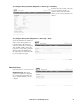
Custom E-mail server settings.
Path: Diagnostics > Notification > E-mail > Server
Notification Settings pages.
Setting Description
From Address
The contents of the From field in e-mail messages sent by the UPS:
• In the format user@ [IP_address] (if an IP address is specified as Local SMTP Server)
• In the format user@domain (if DNS is configured and the DNS name is specified as Local SMTP
Server) in the e-mail messages.
Note: The local SMTP server may require that you use a valid user account on the server for this setting.
See the server’s documentation.
SMTP Server The IPv4/ IPv6 address or DNS name of the local SMTP server.
Port The SMTP port number, with a default of 25.
User Name
Password
Confirm
Password
If your mail server requires authentication, type your user name and password here.
Use SSL/TLS
The SMTP server only accepts connections that begin encrypted. No STARTTLS message is sent to the
server. If you are using a public email server it is likely that encryption is required. Check with your
service provider to see what they support. If service provider explicitly supports SSL/TLS then it is best
to start by choosing the "implicitly" option. If that does not work then choose the “If Supported”. Here
are some common settings for public email providers as of when this product was released.
The settings above are provided for convenience only. Please check with your service provider for the
most current SMTP server name and port.
E-mail user
according to severity
of events
Enable or disable the e-mail notification for the selected events that are grouped by severity.
bu363a
bu362a