
Specifications






Back-UPS Pro 500 BG500 120 Vac44
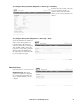
To resize the event log.
Path: Diagnostics > Events Logs >
Size
When you resize the event log in order
to specify a maximum size, all
existing log entries are deleted. When
the log subsequently reaches the
maximum size, the older entries are
deleted.
Data Log Filter
Path: Diagnostics > Data Log > Filter
View a log of measurements about the
UPS, maximum output voltage, minimal
output voltage, output voltage, load,
battery capacity.
The steps to display and resize the data
log are the same as for the event log,
except that you use menu options under
Data instead of Events.
To filter the data log by date or time, use
the Last or From radio buttons. (The
filter configuration is saved until the
UPS restarts).To delete all data recorded
in the data log, click Clear Data Log.
Deleted data cannot be retrieved.
To set the data collection interval (Diagnostics > Data Logs > Interval):
Define, in the Log Interval setting,
how frequently data is sampled and
stored in the data log. When you click
Apply, the number of possible storage
days is recalculated and display at the
top of the screen. When the log is full,
the oldest entries are deleted. To avoid
automatic deletion of older data, see
“To configure data log rotation (Logs
> Data > Rotation)”.
bu296a
bu297a
bu357a