
Specifications




Back-UPS Pro 500 BG500 120 Vac 15
Windows 7
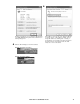
Right click the battery icon, select Power Options.
On the Select a power plan page, next to the plan you
want to change, click Change plan settings.
On the Change settings for the plan page, click Change
advanced power settings.
On the Advanced settings tab, expand Battery, expand
Low battery level, Reserve battery level, and Critical
battery level. Change the percentage of battery remaining
that you want for each level, and then click OK.
To configure the Windows 7 to shutdown itself, expand
Critical battery action. From the drop down box next to On
battery item, select Hibernate or Shutdown, and click OK
button to save the settings. Then Windows will hibernate
or shutdown itself when the percentage of battery
remaining drops below the configured critical level.
bu316a
bu317a
bu320a
bu321a
bu322a