
Specifications




Back-UPS Pro 500 BG500 120 Vac14
Configuring PC Shutdown
Make sure the battery icon on the previous section is already present on the system tray / task bar of your operating
system before proceeding to configuring the PC shutdown.
Mac OS X
Turn on the UPS, connect the UPS to the Mac computer using the supplied USB cable.
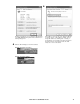
1.Click System Preferences icon along the Dock.
Click Energy Saver icon, you should see a UPS tab
displayed in the dialog.
Click UPS tab, check Show UPS status in the menu bar
option. The Mac OS X will then display a UPS icon in the
menu bar.
To configure the shutdown options, click on the
Shutdown Options button.
After configuring the shutdown options, click Done.
bu304a
bu305a
bu306a
bu307a
bu308a
bu309a