
Specifications




Back-UPS Pro 500 BG500 120 Vac12
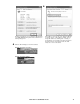
4.3 In the Hardware Update Wizard window, select Install
from a list or specific location (Advanced), then click
Next button.
4.4 In the Hardware Update Wizard – Please choose your
search and installation options window, select Don’t
search. I will choose the driver to install, then click the
Next button.
4.5 In the Hardware Update Wizard – Select the device
driver you want to install for this hardware. Choose HID
UPS Battery, then click Next button.
4.6 In the Hardware Update Wizard – Completing the
Hardware Update Wizard window, click Finish button.
bu327a
bu328a
bu329a
bu330a