
Specifications




Back-UPS Pro 500 BG500 120 Vac 11
Windows XP
1.Turn on UPS and connect UPS to the Windows XP computer via a USB cable.
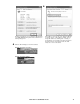
Click Start --> Setting --> Control Panel --> System. In
the System Properties window click the Hardware tab,
then click Hardware Manager button.
In the Device Manager window, expand Batteries. There
should be a HID UPS Battery listing under Battery. Then
you can skip following steps. If you see an APC UPS
device instead of a HID UPS Battery device. You need to
update the driver of UPS to the driver of HID UPS
Battery
Updating the driver from APC UPS to HID UPS
Battery
4.1 Double click the APC UPS device. 4.2 From the Driver tab, click on the Update Driver
button
bu323a
bu324a
bu325a
bu326a