
Specifications




Back-UPS Pro 500 BG500 120 Vac10
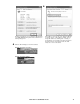
Figure I Figure J
Figure K
3.4 You can now configure Power Options to shutdown
when UPS is on Battery.
If the battery icon is not displayed in the system tray,
click Control Panel, click Appearance and
Personalization. Under the Taskbar and Start Menu group
click Customize icons on the taskbar.
Then click Turn system icons on or off.
Click the dropdown box for the Power system icon, select
On from the list. Now Windows should display the battery
icon in the system tray
.
bu340a
bu341a
bu342a
bu314a
bu315a