
Specifications




Back-UPS Pro 500 BG500 120 Vac 9
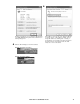
Figure D Figure E
3.2 Option 1 - To roll the driver back: Go to Control Panel – Device Manager – Batteries – Select the APC UPS or APC
Battery BackUP – Select Driver tab – select Roll Back Driver. The Driver will revert to HID UPS (Figures D & E).
Figure F Figure G
Figure H
3.3 Option 2 – If you cannot roll the driver back (roll back is
grayed out) select Update Driver (Figure F) – Browse my
Computer for Driver Software (Figure G) – Select Let me Pick
from List of Device Driver on my Computer (Figure H) select
HID UPS from list (Figure I)
bu319a
bu324a
bu313a
bu338a
bu339a