
User manual




English
---------------------------------------------------------------------------------
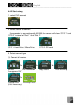
(1.1) Press the “Left” or “Right” button to “All files” and press “OK” button
for 3 seconds (“Long press OK”).
(1.2) AD330 will show some information on the screen. Please refer to the
disc numbers and prepare enough blank DVD discs or rewritable DVD
discs (that should be erased before use). Insert the disc and close the
tray completely.
(1.3) Press “OK” button to start “DVD convert” or press “Exit” to cancel.
(1.4) Please be patient with the “Disc finalizing” process; after that, AD330
will show “Burning finish” on the screen.
(2) Convert the movies you want
> > >
Select files Mode Select folder Select multiple files File information
“Long press OK”
> > >
Copy status Disc finalizing Change Disc Burning Finish
(if it’s necessary)
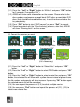
(2.1) Press the “Left” or “Right” button to “Select files” and press “OK”
button.
(2.2) Press the “Left” or “Right” button to select PRG folder and press “OK”
button.
(2.3) Press the “Left” or “Right” button to select movie files and press “OK”
button; the selected file will show with a yellow frame instead of green frame,
the file number and capacity will also increase. If pressing “OK” button again,
the selected movie file will be canceled.
(2.4) You can repeat the process of (2.3) to select multiple movies.
(2.5) You can press “Exit” button and repeat the process of (2.2), (2.3) to
select more movie files.
28