
User manual




English
---------------------------------------------------------------------------------
4.4 DVD Convert Mode
4.4.1 Before use
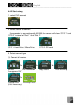
a. b. c. d. e.
f. g. h. i. j.
Plug power adapter into AD330 and turn on. “refer to icon a”
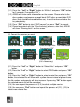
1. Plug power adapter into JVC camcorder and turn the switch to “play
mode”, “refer to icon b, c”.
2. Plug the USB cable (mini-A) into AD330.“refer to icon d, e”
3. Plug the USB cable (mini-B) into JVC camcorder. “refer to icon f, g, h”
4. Connect both USB cables (the other end of both mini-A and mini-B).
“refer to icon i, j”
5. Check whether camcorder is showing on the screen or not.
6. You should make a memo to list which movies files or playlist that you
want before using AD330.
25