
User's Manual


15
CUSTOMIZING TV SETTINGS
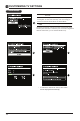
• Press MENU to display the main interface, then
use the Arrow buttons to highlight TV Settings
and press OK to confirm. Use the Arrow but-
tons to cycle among different options and select
General to enter and adjust each option setting.
MENU LANGUAGE
Select the menu language among
English, Français or Español. The
default on-screen menu language
is English.
TRANSPARENCY
Select to turn On/Off transparency
function.
ZOOM MODE
Select zoom mode:
Wide/Wide Zoom/Zoom/Standard/
Just Scan(at HDMI mode)/
Dot by Dot(at VGA mode).
Note: With a different input source,
the zoom mode options may differ.
VGA SETTINGS
Adjust advanced option’s setting:
HORIZONTAL POS, VERTICAL POS,
CLOCK, PHASE or AUTO.
(only available in VGA mode)
GENERAL
TV SETTINGS
• Press the MENU button on the main unit or on the remote control to display the
main interface. Then use the Arrow buttons to highlight TV Settings and press
OK to enter. Then use the Arrow buttons to cycle among the following options
and select the desired one to enter.