
User guide



NX2200 User Guide
© 2012 ExaDigm, Inc. Page 8 of 17 Rev. 1/0812
8.0 Powering Terminal
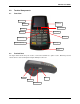
To power on terminal press orange Power key until beep is heard. The boot up process will display.
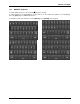
To power down terminal press orange Power key until the message below appears. Press power again to
complete process.
9.0 Card Swipe
Swipe card through reader with the magnetic stripe facing down and toward the terminal.
10.0 Modem Configurations
Ensure that the terminal is properly connected to an active power source or with a fully charged battery in
it.
10.1 CDMA
Before you use the terminal to do live transactions with TCP/IP connections, you need to make sure the
modem is activated. Contact your network carrier, ISO or ExaDigm to confirm activation.
10.2 GSM/GPRS
Before you use the terminal to do live transactions with TCP/IP connections, you need to make sure the
modem is activated by inserting the SIM card. Contact your network carrier, ISO or ExaDigm to confirm
activation.
10.3 Ethernet
Connect the Ethernet cable to the Ethernet port (LAN) on the side of the terminal.
10.4 WiFi
Connect the mini USB stick to one of the available USB ports on the side of the NX2200.
Press power key again to
power off!!
Other keys to cancel.