
Widescreen Video Touch Panel Operation/Reference Guide


Firmware Pages and Descriptions
91
5" Modero Widescreen Touch Panel
Using the Connection Utility
1.
Press the Tools button in the Protected Setup Navigation Buttons section. This opens the Too l s
menu.
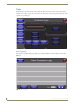
2. Within the To o l s menu, press the Connection Utility button. This launches the Connection Utility
popup.
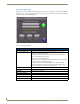
3. Move the panel within your network. The Connection Information notes the IP of the connected
master and the IP of your panel. The Connection Statistics show the current quality of the panel
connection.
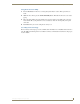
4. Push Close when you are done using the site survey tool.
Secondary Connection Page
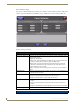
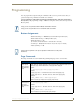
The Secondary Connection page sets the communication information for an installed wireless interface
card. The NXD-CV5 Touch panel is not enabled for wireless communication and therefore, this page is
not user-editable.