
Widescreen Video Touch Panel Operation/Reference Guide


Firmware Pages and Descriptions
86
5" Modero Widescreen Touch Panel
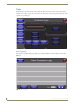
Tools
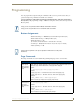
The Tools button provides a menu to select either the Panel Logs Page section on page 86, the Panel
Statistics Page section on page 88, or the Connection Utility Page section on page 90. Select any of the
options to access that page.
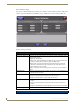
Panel Logs Page
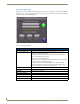
The options on the Panel Logs page allow you to view and track the connection history of the panel
(FIG. 75).
FIG. 74 Tools menu
FIG. 75 Panel Logs page