
Widescreen Video Touch Panel Operation/Reference Guide
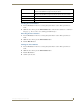

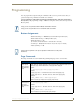

Firmware Pages and Descriptions
85
5" Modero Widescreen Touch Panel
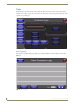
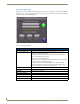
Password Settings Page
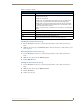
Back: Saves all changes and returns to the previous page.
Connection Status icon: The icon in the upper-right corner of each Setup page shows online/offline state
of the panel to the master.
• Bright red - disconnected
• Bright green - connected. Blinks when a blink message is received to dark
green every 5 seconds for half a second then go back to bright green.
• Bright yellow - panel missed a blink message from the master. It will remain
yellow for 3 missed blink messages and then turn red. It will return to green
when a blink message is received.
Note: a Lock appears on the icon if the panel is connected to a secured NetLinx
Master.
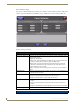
In Panel Password
Change:
Accesses the alphanumeric values associated to particular password sets.
• The PASSWORD 1, 2, 3, 4 and 5 (protected) buttons open a keyboard to
enter alphanumeric values associated to the selected password group.
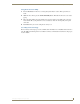
Note: Clearing Password #5 removes the need to enter a password before
accessing the Protected Setup page.