
Widescreen Video Touch Panel Operation/Reference Guide

Introduction
3
5" Modero Widescreen Touch Panel
Specifications for 5" Widescreen Video Touch Panel (Cont.)
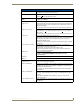
Viewing Angles: • 90° total viewing angle:
- Horizontal: +
45° (left and right from center)
IR Reception Angle: • Horizontal: +
25° (left and right from center)
•Vertical: +
15° (up and down from center)
Supported Audio Sample
Rates:
• 48000Hz, 44100Hz, 32000Hz, 24000Hz, 22050Hz, 16000Hz, 12000Hz,
11025Hz, and 8000Hz.
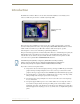
Front Panel Components:
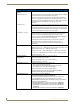
Light sensor: • Photosensitive light detector for automatic adjustment of the panel brightness
(a dim room results in a dimmer LCD display, and a bright room results in a
brighter LCD display).
Note: The light sensor can be adjusted via the Sensor Setup page (page 78).
Motion sensor (PIR): • Proximity Infrared Detector to wake the panel when the panel is approached.
• Activation range: +
25° (left and right from center) and + 15° (up and down
from center).
Note: This sensor can be adjusted via the Sensor Setup page (see page 78).
IR Receiver: • IR reception 38 KHz and 455 KHz IR frequencies.
• The IR receiver is located beneath the translucent Front Setup button. When
an IR code is detected it is sent to the NetLinx Master as a push on the
appropriate AMX IR channel.
• IR receivers and transmitters on G4 panels share the device address number
of the panel.
Front setup access button: • Provides both access to the Setup and Calibration page and toggles the
panel between a "sleep" or "wake" state.
- When wired, "sleep" status means the backlight is Off.
- When battery operated, wireless "sleep" status means the touch panel
base is either Off or "suspended".
Microphone: • Used for intercom applications
(requires the NXA-AVB/ETHERNET Breakout Box for analog
communication)
Speakers: • Stereo output with a frequency response of 500 Hz - 7 KHz
Buttons: • 6 programmable pushbuttons
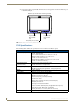
Side Panel Components:
PWR connector: • 2-pin 3.5 mm mini-Phoenix connector.
Ethernet 10/100 port: • RJ-45 port for 10/100 Mbps communication. The Ethernet port automatically
negotiates the connection speed (10 Mbps or 100 Mbps), and whether to use
half duplex or full duplex mode.
• CV5 panels communicate with the NetLinx Master using the ICSP protocol
over Ethernet.
Ethernet 10/100 LEDs: • LEDs show communication activity and connection information:
A-activity - Yellow LED lights when receiving or transmitting Ethernet data
packets.
L-link - Green LED lights when the Ethernet cables are connected and
terminated correctly.
Stereo Output connector: • Stereo output through a 3.5mm mini-jack (for use with external speakers or
headphones).