
Widescreen Video Touch Panel Operation/Reference Guide

Firmware Pages and Descriptions
82
5" Modero Widescreen Touch Panel
Image Caching Page
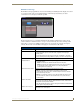
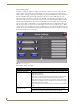
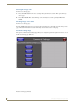
The Image Caching page (FIG. 72) configures the allocation of memory for image caching. The G4
graphics engine caches images to decrease load time of previously viewed images. RAM caching is
always enabled, and images (both static and dynamic) are stored in the RAM cache as they are viewed.
The size of RAM cache is automatically configured to take into account available memory versus
memory that may be needed by the panel later. As the RAM cache approaches its maximum size, the
oldest items in the cache may be discarded to make room for newer items. If Flash caching is enabled,
dynamic images that would have been discarded will actually be moved to Flash, since it is typically
faster to retrieve images on Flash than across a network (although it is slower than RAM cache). Note
that since static images are already stored on Flash, they are never moved to the Flash cache, so Flash
caching applies only to dynamic images. Images in Flash cache are moved back to RAM cache the next
time they are viewed. As the Flash cache approaches its maximum size, the least recently used items may
be discarded to make room for new items.
The elements of this page include:
FIG. 72 Image Caching Page
Image Caching Page Elements
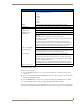
Back: Saves all changes and returns to the previous page.
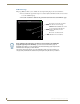
Connection Status icon: The icon in the upper-right corner of each Setup page shows online/offline state
of the panel to the master.
• Bright red - disconnected
• Bright green - connected. Blinks when a blink message is received to dark
green every 5 seconds for half a second then go back to bright green.
• Bright yellow - panel missed a blink message from the master. It will remain
yellow for 3 missed blink messages and then turn red. It will return to green
when a blink message is received.
Note: a Lock appears on the icon if the panel is connected to a secured NetLinx
Master.
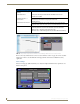
Image Cache Settings: Allocates Flash memory for image caching.
Flash Cache Size Press the Up and Down arrows to add and remove memory. Flash memory
allocation cannot exceed the amount of Flash memory on the panel.