
Widescreen Video Touch Panel Operation/Reference Guide

Firmware Pages and Descriptions
69
5" Modero Widescreen Touch Panel
Supported sampling rates for WAV
The following is a listing of supported sampling rates associated for WAV files played on a CV5 panel.
Some WAV files currently played on Modero's may not work on these panels. The supported sampling
rates for WAV files are:
Video Adjustment Page
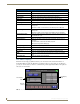
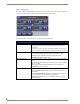
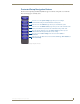
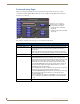
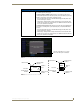
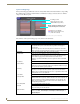
The Video Setup page (FIG. 61) (accessed by pressing the Video Adjustment button on the Setup page)
sets the Video properties of the incoming video signal from an NXA-AVB/ETHERNET Breakout Box.
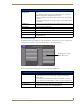
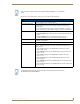
Volume Page Elements (Cont.)
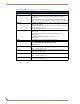
Line In Level: Allows you to adjust the current Line-In volume level (being received from the
communicating breakout box).
• Use the UP/DN buttons to adjust the Line-In volume level (range = 0 - 100).
• The Line-In Level bargraph indicates the current Line-In level.
• The Mute button mutes the Line-In volume.
Mic Out Level: Allows you to adjust the current Microphone volume level (being received from
the communicating breakout box).
• Use the UP/DN buttons to adjust the Microphone volume level
(range = 0 - 100).
• The Mic Out Level bargraph indicates the current Mic Out level.
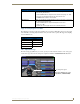
Supported WAV Sampling Rates
• 48000 Hz • 16000 Hz
• 44100 Hz • 12000 Hz
• 32000 Hz • 11025 Hz
• 24000 Hz • 8000 Hz
• 22050 Hz
FIG. 61
Video Setup page (showing default values)
Incoming Video signal
Once done making your screen
adjustments, SAVE SETTINGS.