
Widescreen Video Touch Panel Operation/Reference Guide

Upgrading Modero Firmware
60
5" Modero Widescreen Touch Panel
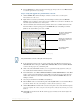
11. Click Close (after the panel reboots) to return to the main program.
12. Right-click the associated System number and select Refresh System. This causes a refresh of all
project systems, establishes a new connection to the Master, and populates the System list with
devices on your particular system.
13. Confirm the panel has been properly updated to the correct firmware version.
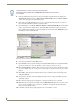
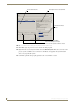
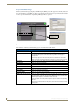
FIG. 53 Send to NetLinx Device dialog (showing Modero firmware update via IP)
Selected Firmware file
Description field for selected Kit file
Device and System values
must match the System and Device values
listed in the Workspace window
Firmware download
status