
Widescreen Video Touch Panel Operation/Reference Guide

Installation
20
5" Modero Widescreen Touch Panel
4. Thread the incoming power, RJ-45 audio/video, Ethernet, and USB wiring through the knockouts
(use of the left wiring knockouts are recommended with this installation).
Leave enough slack in the wiring to accommodate any re-positioning of the panel.
5. Install the drywall/sheetrock before inserting the main NXD unit into the CB-TP5.
Installation of an NXD Touch Panel
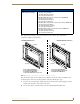
The NXD-CV5 can be installed either directly into the (optional) CB-TP5 or other solid surface
environment using the two different mounting options: drywall clips or solid surface screws. The
following sections describe mounting the touch panel directly into a pre-wall rough-in box, a solid
surface or drywall, and optional NXA-RK5 Rack Mount Kit.
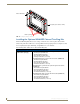
Installing the NXD panel within a Rough-In Box
The rough-in box must be mounted prior to continuing this section. Refer to the procedures in the
Pre-Wall Installation of the Rough-In Box section on page 19 for detailed pre-wall installation
instructions. Verify that all necessary cables have been threaded through the knockouts on the left of the
rough-in box and the connections have been tested prior to installation of the NXD-CV5.
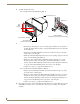
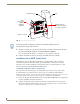
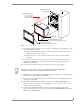
1. Remove the Faceplate/bezel (A in FIG. 18) from the main NXD unit (B in FIG. 18) by gripping the
faceplate and pulling with gentle outward force.
2. Verify the incoming power, RJ-45 audio/video, Ethernet, and USB cables have been properly
threaded through the wiring knockouts on the left of the rough-in box. Leave enough slack in the
wiring to accommodate any re-positioning of the panel.
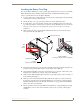
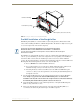
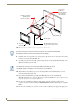
FIG. 17 CB-TP5 rough-in box components
Stud
Stud Mounting tabs
Drywall or sheetrock
Wiring
knockouts (6)
(must be
located on
left side)
NXD Mounting tabs
(should lie flush against
the outside of the wall)
Remember that when mounting this rough-in box, the NXD mounting tabs must lie
flush against the outside of the sheetrock.