
Widescreen Video Touch Panel Operation/Reference Guide

Installation
17
5" Modero Widescreen Touch Panel
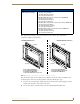
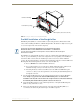
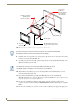
FIG. 14 provides an example of the general contents for each of the two types of Bezel Kit
configurations (Button and No-Button).
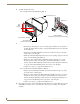
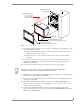
These Bezel Kits require some assembly prior to installation onto the panel. Once assembled, the pre-
existing Faceplate can be removed and upgraded by using the following these steps.
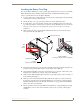
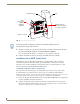
1. To remove the current Faceplate, simply pull it away from the panel by gently tugging it outwards
until the entire Faceplate comes away from the panel.
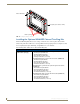
2. Use the above table to determine which of the optional Trim Rings Kits will be used.
NXA-BEZ Trim Ring Kits (CV5) (Cont.)
NXA-BEZ-5NB Trim Ring Kits
(without button openings)
• NXA-BEZ-5NB-BG, Beige Faceplate without buttons (FG2261-42)
- Two Beige Faceplates/Bezels
- Two Beige No-Button Trim RIngs
- Two Self-adhesive AMX labels
• NXA-BEZ-5NB-BL, Black Faceplate without buttons (FG2261-40)
- Two Black Faceplates/Bezels
- Two Black No-Button Trim RIngs
- Two Self-adhesive AMX labels
• NXA-BEZ-5NB-LA, Light Almond Faceplate without buttons (FG2261-43)
- Two Almond Faceplates/Bezels
- Two Almond No-Button Trim RIngs
- Two Self-adhesive AMX labels
• NXA-BEZ-5NB-WH, White Faceplate without buttons (FG2261-41)
- Two White Faceplates/Bezels
- Two White No-Button Trim RIngs
- Two Self-adhesive AMX labels
FIG. 14
Trim Ring Kit Contents (Button and No-Button configurations shown)
(2 sets)
(2 sets)
(2 sets)
(2 sets)
- 2 Colored Faceplate/Bezels
- 2 Colored Button Trim Rings
- 2 Self-adhesive AMX labels
- 12 Colored Pushbuttons (2 sets of 6)
- 2 Colored Faceplate/Bezels
- 2 Colored No-Button Trim Rings
- 2 Self-adhesive AMX labels
NXA-BEZ-5B With Buttons NXA-BEZ-5NB Without Buttons