
Widescreen Video Touch Panel Operation/Reference Guide

Installation
15
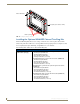
5" Modero Widescreen Touch Panel
Installing the Button Trim Ring
The outer No-Button Trim Ring is secured to the Faceplate with plastic latches. In order to re-install the
Button Trim Ring back onto an NXD panel which has had the default Button Trim Ring features
removed; you must first remove the No-Button Trim Ring:
1. To remove the Faceplate, simply pull it away from the panel by gently tugging it outwards until the
entire Faceplate comes away from the panel.
2. Turn the Faceplate over to expose the inside surface and view the Trim Ring latches.
3. In a single motion, press down and then outwards on the two Trim Ring latches located along the
top of the internal surface of the Faceplate to begin removing the Trim Ring. Removing the Internal
Faceplate from the panel exposes the pushbuttons openings left from an earlier removal of the
pushbuttons.
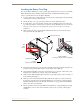
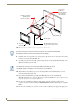
4. Gently tug along the edges of the No-Button Trim Ring and work your way around the edges to
remove it from the Faceplate (FIG. 12).
5. From along the internal surface of the Faceplate, install the six buttons by firmly inserting them into
the button openings until the Button latch secures the button in place (FIG. 12).
6. Grasp the Button Trim Ring on both sides and fit it into the groove along the outside surface of the
Faceplate (made available by the removal of the previous Trim Ring).
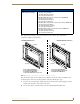
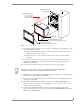
7. Gently insert the Button Trim Ring latches into their corresponding openings on the outer surface of
the internal Faceplate (FIG. 13).
8. Firmly press down around the Button Trim Ring until all of the latches are securely inserted into
their openings on the Faceplate, and the Button Trim Ring is securely fastened. Verify the Button
Trim Ring is firmly inserted onto the Faceplate and that there are no gaps between this Trim Ring
and the outer surface of the Faceplate.
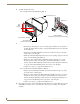
9. Place the Faceplate back onto the main NXD-CV5 unit. Make sure to align the Microphone, Light,
and PIR Motion sensor locations on the main unit to their respective openings on the Faceplate
assembly.
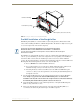
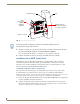
FIG. 12 Removing the No-Button Trim Ring
No-Button Trim Ring
Tr i m
Faceplate
CV5 Panel/enclosure
Ring
Latches
(outside surface shown)
Button latch
Button installation
(showing the internal surface of Faceplate)