
Widescreen Video Touch Panel Operation/Reference Guide



Introduction
5
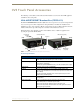
5" Modero Widescreen Touch Panel
CV5 Panels - Connector Layout
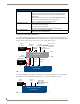
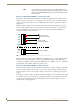
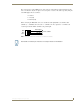
FIG. 3 shows the layout of the connectors (located on the left side panel of the NXD-CV5 panel).
Specifications for 5" Widescreen Video Touch Panel (Cont.)
Other AMX Equipment
(Cont.):
• NXA-BEZ-5NB, Bezel Kit without buttons for Modero 5” Widescreen Wall/
Flush Mount Touch Panel (NXD-CV5)
- NXA-BEZ-5NB-BG, Beige Faceplate without buttons (FG2261-42)
- NXA-BEZ-5NB-BL, Black Faceplate without buttons (FG2261-40)
- NXA-BEZ-5NB-LA, Light Almond Faceplate without buttons (FG2261-43)
- NXA-BEZ-5NB-WH, White Faceplate without buttons (FG2261-41)
• NXA-CV5AM, Modero 5" Angle Mount Kit (FG2904-56):
- Wedge for 5" WallMount
- Wedge Mounting Template - Flush Mount Drywall Installation
- Three 1/8" diameter by 3" length Toggle Bolts (with wings)
- Three 4-20 x.375 LG screws, PPH, Plastite, Black Zinc
• NXA-RK5 RackMount Kit for 5" Wall Mount panels (FG2904-55):
- 5" RakMount
- Four Screws, #10-32 x.625, PH Truss, BLK
- Four Washers, #10, Black Nylon
- Three Screws, #4-40 x.250, PPH, BLK
It is recommended that firmware KIT files only be transferred over a direct USB or
Ethernet connection and only when the panel is connected to a power supply. If
battery power fails during a firmware upgrade, the panel flash file system may
become corrupted.
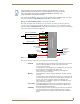
FIG. 3 Connector layout and location on the CV5 touch panel
AL
ETHERNET
PWR
12VDC
PWR
12VDC
ETHERNET
AUDIO / VIDEO
AL
AUDIO / VIDEO
Audio-Video from
Ethernet (CAT5)
Power
Keyboard/Mouse
Mini-USB (Program)
NXA-AVB/ETHERNET (CAT5)
(USB)
Stereo Output